
About WhisperChat
Learn how WhisperChat works under the hood, get started, and find answers to common questions.
Getting Started
1. Sign Up & CAPTCHA
Create an account with email & password. During signup we run an invisible reCAPTCHA v3 check (no extra clicks). Upon success your account is created and your PGP keypair is generated.
2. PGP Key Generation
In‑browser, we generate an RSA‑2048 keypair (via OpenPGP.js). Yourpublic key goes to Firestore; your private key is encrypted by your passphrase and stored only in localStorage.
3. Save & Backup
From the Dashboard you can export both your public & private keys. Store them safely—if you lose your private key or forget its passphrase, past messages cannot be recovered.
4. Build Your Network
Share your UID (found on Dashboard) with friends. They can search by UID to send you a chat request, which you approve on your Dashboard. Once both parties flip “approved” in Firestore, the conversation unlocks.
5. Real‑Time Encrypted Chat
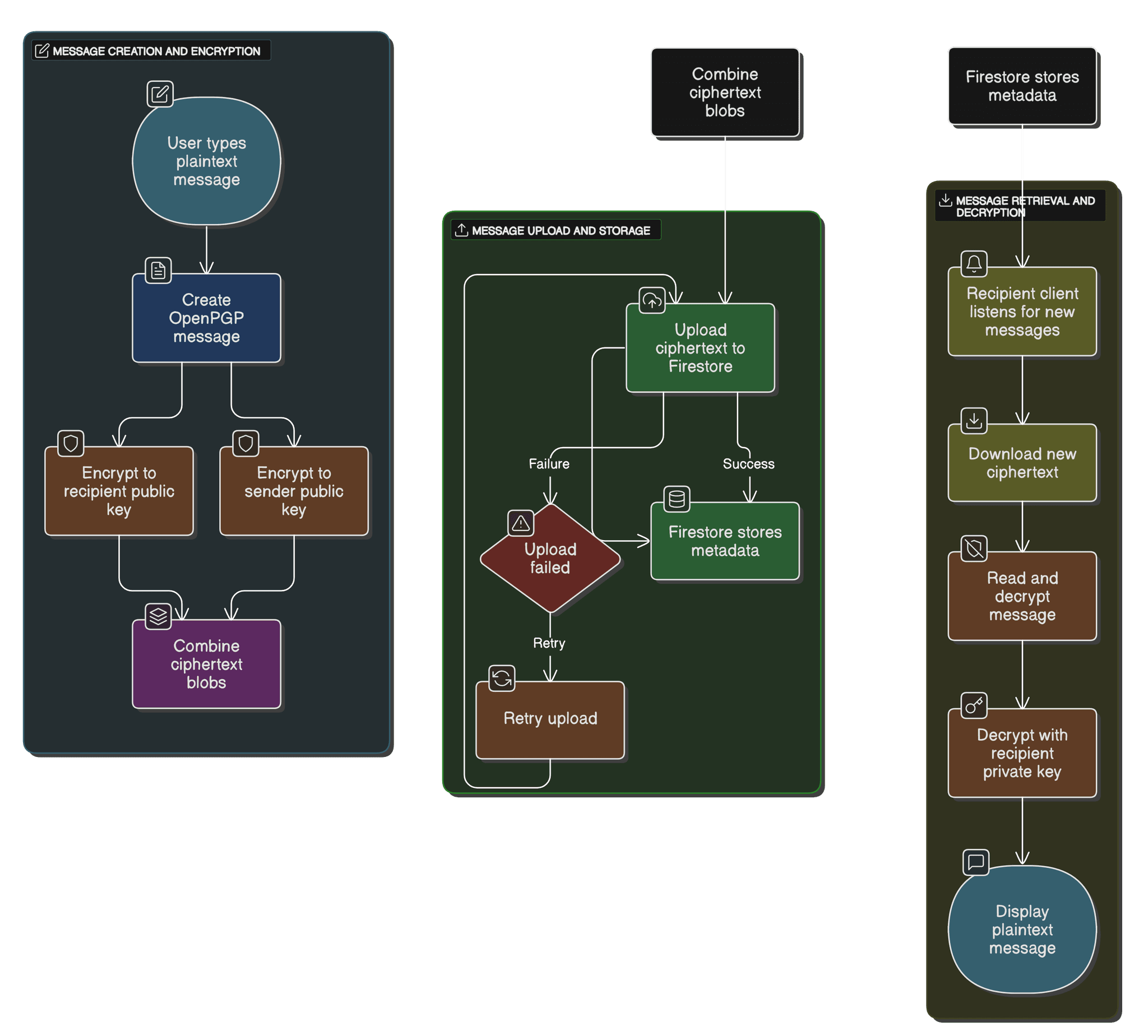
Messages you send are encrypted to both public keys (yours & theirs) so you can decrypt your own sends. All encryption/ decryption happens client‑side; Firestore stores only ciphertext.
6. Key Rotation
When you want fresh keys, visit the Key Gen page. It generates a new keypair, updates your Firestore public key, and replaces the private key in your browser (encrypted under your passphrase).
How It Works
Below is the high‑level data flow: signup, key‑exchange, message encryption in the browser, Firestore storage, and decryption on the client.
Frequently Asked Questions
What happens if I lose my private key?
Your private key is the only way to decrypt messages sent to you. If you lose it (or forget its passphrase), you will no longer be able to read past messages. You can generate a new keypair via the Key Gen page, but messages encrypted under your old key remain unrecoverable.
Can I use WhisperChat on multiple devices?
Absolutely. Simply export your encrypted private key (from Dashboard → Export), then import it (Dashboard → Import) on each device. Remember your passphrase!
What’s the difference between a “friend” and a “chat request”?
A “friend” lives in your sidebar for one‐click chatting. A “chat request” is the one‑time PGP handshake in Firestore’s conversations/approved map that both participants must flip to true before messages flow.
How is reCAPTCHA v3 used?
We run an invisible Google reCAPTCHA v3 check on the signup form to block bot signups. It runs silently in the background—no puzzles or clicks required.
Can I change my profile picture?
Yes. On your Profile page, upload a PNG under 200 KB and we’ll store it securely in Firebase Storage. It shows up everywhere you chat.
Is any message data stored unencrypted?
No. Firestore only ever sees ciphertext, sender UIDs, timestamps, and read‑status metadata. Decryption happens entirely in your browser via OpenPGP.js.
Support the Project
If you find WhisperChat useful, a Bitcoin donation helps keep it online:
bc1qq4am0j9zly8l3vtam0ahsq74pptpfuwxgtlxrhg3ekw3jpwdpdjs35vh48